
Organize your Inbox
Four tools keep your Inbox in order: the folders, the AI filters, the search box and the pins.
The folders
Section titled “The folders”The Folders column (collapsible) filters the list with one click, always with its counter beside it:
- My inbox — Open (everything alive), Mine (assigned to you), Unassigned (waiting for an owner), Quoted and Closed.
- Labels — one folder per business label, with its color.
- My teams — each of your teams’ work; the rest sit under Other teams.
The AI filters
Section titled “The AI filters”Two groups of chips, always visible, that come alive when the Assistant classifies conversations:
- Priority (AI) — High, Medium, Low: handle the urgent first.
- Intent (AI) — Purchase, Inquiry, Support, Complaint, Follow-up: filter by what the customer wants. They combine: “high-priority purchases” is one click on each chip.
Search
Section titled “Search”The list’s search box finds by the contact’s name, phone or email — and by the text of the last message. It searches the whole business, not just what’s on screen.
Pin what matters
Section titled “Pin what matters”From any card’s ⋮ menu: Pin only for me raises it to your Pinned group (only you see it on top). The owner and admins can also Pin for everyone — handy for the hot case the whole team must keep in sight.
Read the card at a glance
Section titled “Read the card at a glance”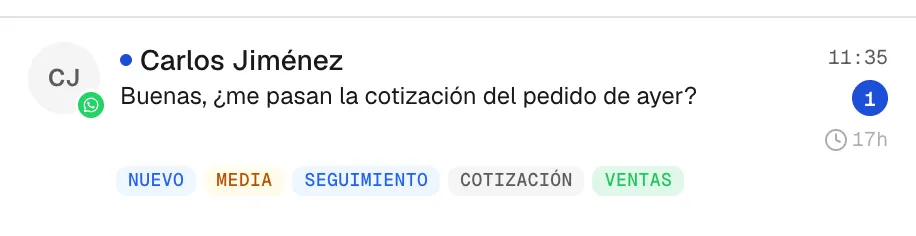
Every card tells you everything without opening it: the channel (icon), the status (New, In progress, Quoted, Won…), WhatsApp’s 24-hour window clock, the AI chips, the labels, the team and how many messages await you.